Tips for Enabling Two-Factor Authentication in Your Favorite Apps
Understanding the Importance of Two-Factor Authentication
In our increasingly connected world, the security of personal information cannot be overstated. With a growing reliance on digital platforms for everything from shopping to banking, we expose ourselves to various cyber threats. One effective strategy to counter these threats is Two-Factor Authentication (2FA). By adding an additional layer of security, 2FA significantly decreases the likelihood of unauthorized access to your online accounts.
Let’s explore some compelling reasons to consider enabling 2FA on your accounts:
- Enhanced Security: In the unfortunate event that your password is compromised, 2FA acts as a safety net. Even with your password in hand, an attacker would still need the second factor of authentication—often a one-time code sent to your smartphone or generated by an app—making unauthorized access substantially more difficult.
- Peace of Mind: Knowing that your accounts are safeguarded with an extra layer of protection can allow for a more relaxed online experience. This sense of security can be crucial when engaging in activities such as online banking or sharing personal data.
- Widespread Adoption: A variety of popular applications such as Instagram, Facebook, and financial services like PayPal now support 2FA. This widespread adoption indicates both trust in the system and the necessity for enhanced security in today’s digital interactions.
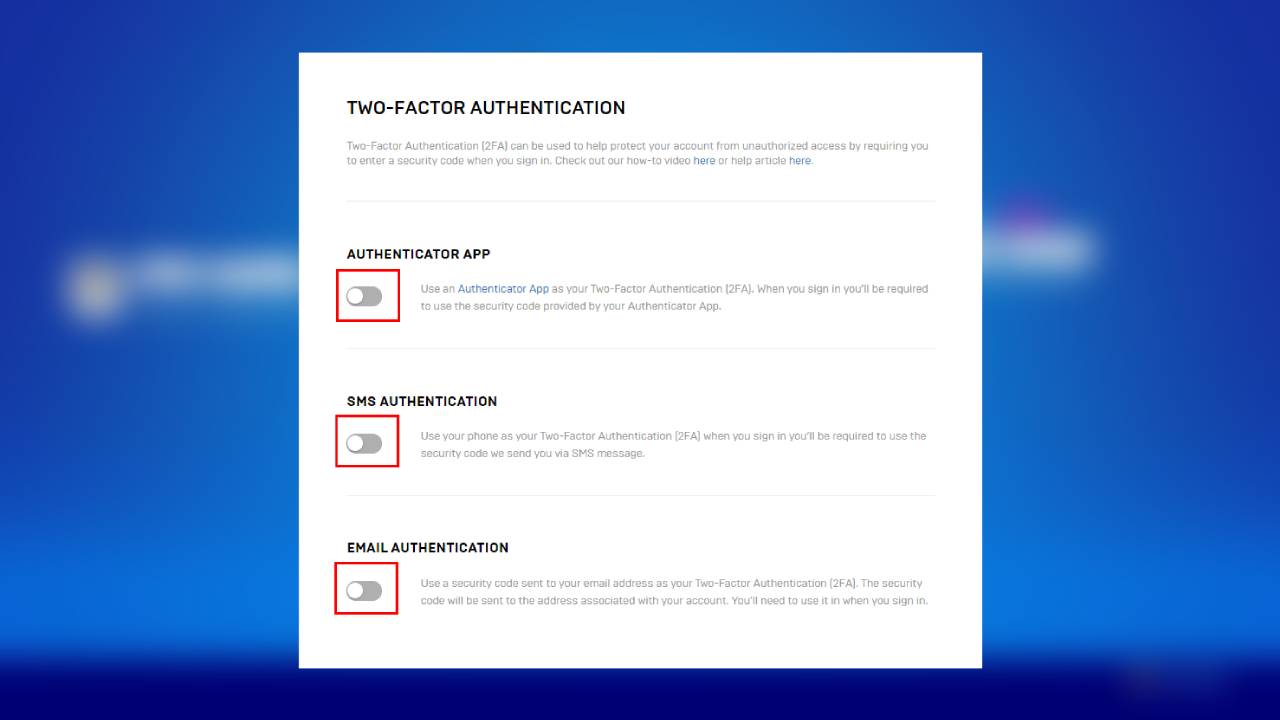
Implementing 2FA can seem daunting, but understanding how to enable this feature across your favorite apps is essential to maintaining your digital security. There are several methods available for 2FA:
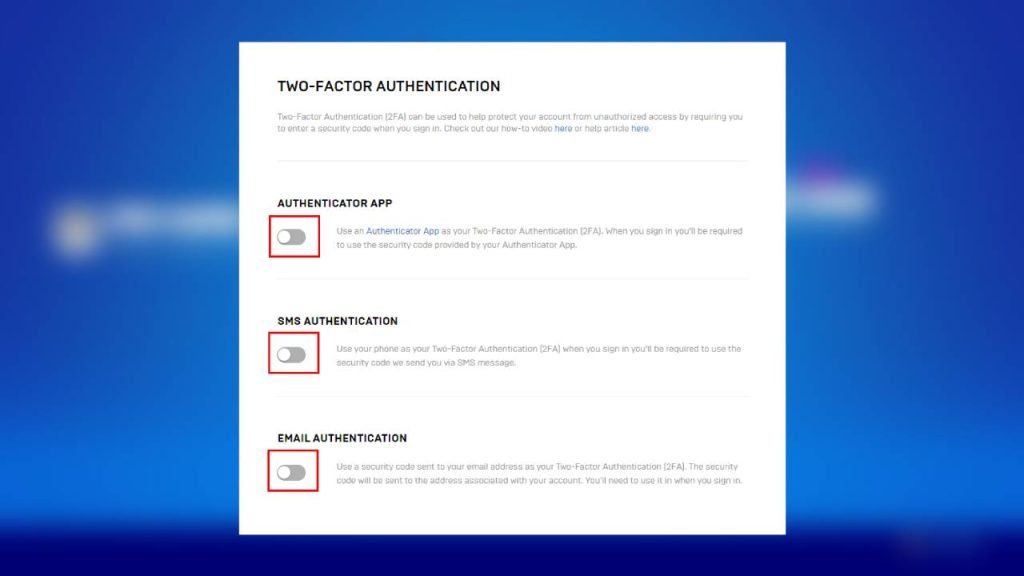
- Authentication Apps: Applications like Google Authenticator or Authy generate time-sensitive codes that you must enter in addition to your password. These apps are not only convenient but also secure, as they do not rely on your mobile carrier.
- SMS Verification: This method sends a one-time code via text message. While it is easy to use, it may be slightly less secure because it can be susceptible to SIM-swapping attacks.
- Email Codes: Gaining access through codes sent directly to your email is another option. However, ensure that your email account has its own security measures, as it serves as a gateway to other accounts.
In the subsequent sections of this article, we will provide you with practical tips and step-by-step instructions to activate and maximize the effectiveness of 2FA. Whether you are a tech novice or a seasoned user, learning how to secure your accounts is an invaluable skill in today’s digital landscape. Join us as we uncover the steps to create a safer online experience for yourself and your family.
DISCOVER MORE: Click here to learn how A/B tests can enhance your app’s user experience
Getting Started with Two-Factor Authentication
As more people recognize the importance of digital security, enabling Two-Factor Authentication (2FA) has become a vital step for safeguarding personal information. But how do you effectively set up 2FA in your favorite apps? Fear not; the process is generally straightforward and can vary slightly depending on the service you use. Below, you will find essential tips and a simplified guide to help you enable 2FA across the most popular platforms.
1. Assess Your Favorite Apps
Before diving into the technical details, take a moment to make a list of the apps and services you use regularly. Some common categories to consider include:
- Social Media: Platforms like Facebook, Instagram, and Twitter offer 2FA, enhancing the security of your online presence.
- Email Services: Gmail, Outlook, and Yahoo Mail allow you to enable 2FA, adding a layer of protection to your communications.
- Financial Services: Banks and payment services like PayPal and Venmo often support 2FA, ensuring your financial transactions remain secure.
Once you have your list, check the official websites or help sections of these apps to verify if they offer 2FA and understand the specifics of their implementation process.
2. Choose Your Verification Method Wisely
When activating 2FA, you will typically be given options on how you prefer to receive your verification codes. Each method has its own pros and cons:
- Authentication Apps: Utilizing apps like Google Authenticator or Authy provides a high level of security. These apps generate codes that are time-sensitive and do not require an internet connection once downloaded.
- SMS Verification: While convenient, this method involves receiving a code via text message. Consider that SMS can be intercepted, making this option less secure compared to authentication apps.
- Hardware Tokens: For businesses or individuals with exceptionally high-security needs, ranging from YubiKey to other hardware solutions, these devices can enhance security significantly.
Evaluate which verification method aligns with your preferences and security needs. If ease-of-use is paramount, SMS might be the way to go initially, but for those willing to invest in security, authentication apps are recommended.
3. Walkthrough of Enabling 2FA
Once you’ve assessed your applications and chosen your verification method, the next step is enabling 2FA. This is where it all comes together:
- Log into Your Account: Start by signing in to the app where you want to enable 2FA.
- Navigate to Security Settings: Look for account or security settings—this can often be found under your profile or account menu.
- Enable 2FA: Select the option to activate 2FA. Depending on the app, it may guide you through the setup process, such as linking your authentication app.
By following these straightforward steps, you will have taken the first crucial steps towards safeguarding your online accounts. In the next sections, we will delve deeper into specific applications and provide tips tailored to amplifying your account protection. The journey towards complete digital security is just beginning, and your proactive approach makes all the difference!
Tips for Enabling Two-Factor Authentication in Your Favorite Apps
As we dive deeper into the critical aspect of enhancing your online security, it’s essential to understand the best practices for implementing Two-Factor Authentication (2FA) across various platforms. Here we explore actionable steps that can fortify your defenses against unauthorized access.
Choose the Right Authentication Method
Two-Factor Authentication offers various methods. Most services provide options such as SMS codes, authentication apps, or hardware tokens. It is advisable to opt for an authentication app like Google Authenticator or Authy instead of SMS codes, as they are generally more secure against potential interception.
Backup Codes
When setting up 2FA, most platforms offer backup codes. These codes can be used in case you lose access to your primary authentication method. Store these codes securely, perhaps in a password manager, so you never find yourself locked out of your account.
Regularly Update Your Settings
Regularly review your 2FA settings and ensure that any devices tied to your account are still in your possession. If you upgrade your phone or change your authentication method, update your settings immediately to maintain security.
Educate Yourself on Phishing Attacks
Even with 2FA, the threat of phishing can’t be ignored. Be vigilant about emails and messages requesting your login information. Always verify the source before entering your credentials, and educate yourself on recognizing potential phishing attempts.
Profile Customization
Many applications allow customization of security settings for added protection. Take the time to explore different options within each app to tailor your security experience. This might include setting security questions, adjusting account recovery settings, or enabling device trust features.
| Category | Details |
|---|---|
| Security Features | Increased account protection through additional verification methods. |
| User Control | Empowers users by giving them control over their account security. |
By taking the time to enable and properly set up Two-Factor Authentication, you essentially layer an additional barrier between your personal information and potential threats. The importance of proactivity in your digital security cannot be overstated, as threats continue to evolve. Stay informed and vigilant as you navigate your favorite apps.
DIVE DEEPER: Click here to discover how A/B tests can elevate your app’s user experience
Enhancing Your Security with Two-Factor Authentication
Once you have successfully enabled Two-Factor Authentication (2FA) across your preferred platforms, it’s essential to optimize your security further by adopting best practices and understanding potential nuances that come with different applications. Below are strategic tips to enhance your security posture and make the most out of your 2FA implementation.
4. Backup Codes are Your Lifeline
Many apps that offer 2FA provide backup codes during the setup process. These codes are a critical component of your security strategy; they can be used if you lose access to your primary verification method, such as your phone. Be sure to:
- Store Backup Codes Securely: Save these codes in a secure location, such as a password manager or a safe physical space. Do not store them on your device or within the app itself to prevent unauthorized access.
- Test Your Backup Codes: Occasionally, try using your backup codes in a safe environment to ensure they work properly and that you remember where you’ve saved them.
Having these codes handy can save you a significant amount of time and hassle if you ever find yourself locked out of your account.
5. Regularly Update Your Recovery Options
When setting up 2FA, you may be asked to select recovery options, which usually include your email or phone number. It is crucial to keep these options updated. This is applicable for:
- Email Addresses: Ensure that the email linked to your account is current and accessible. Use a secondary email for added security in case you’re locked out.
- Phone Numbers: If you change your phone number, update it immediately across all accounts that use it as a verification method to avoid being locked out.
Regular updates ensure that you can regain access to your account quickly in case of loss or locks.
6. Assess the Security of Your Devices
Your 2FA setup is only as strong as the devices you use. Here are a few tips to ensure the devices where you access your accounts are secure:
- Keep Software Updated: Always install the latest updates for your operating system and apps. Security flaws can be remedied with updates that reduce vulnerabilities.
- Use Antivirus Protection: Employing trustworthy antivirus software can protect against malware and other security threats, which is essential when you’re managing sensitive accounts.
Your mobile device or computer can become a point of vulnerability if left inadequately protected. Take proactive measures to maintain their security.
7. Know When 2FA is Supported
Not every application or service offers 2FA. Staying aware of which apps now provide this feature can allow you to expand your digital security landscape. For example:
- Notable Apps with 2FA: Besides the usual suspects like Facebook and Google, popular services such as Dropbox, Slack, and GitHub have also integrated 2FA functionality. Make it a practice to routinely check the security settings of these apps.
- Stay Informed: Follow tech news and updates to learn when new services adopt 2FA or improve their security measures. Being proactive can help safeguard your data as new threats emerge.
Understanding available options and being informed about updates will help you stay a step ahead in the quest for digital security.
By following these enhanced tips for enabling 2FA, you can significantly improve the security of your favorite apps while safeguarding personal information. The confidence of knowing you’ve taken crucial steps toward protecting your online presence is invaluable in today’s digital world.
DIVE DEEPER: Click here to discover how A/B tests can enhance user experience
Final Thoughts on Two-Factor Authentication
In a world where cyber threats are increasingly prevalent, adopting Two-Factor Authentication (2FA) has become more than just a precaution—it is a necessity. By enabling 2FA on your most-used applications, you create an added layer of security that significantly reduces the likelihood of unauthorized access to your personal information. The tips outlined in this article serve as a comprehensive guide, helping you navigate the intricacies of effectively setting up and optimizing your 2FA.
From securely storing backup codes to regularly updating your recovery options, every step you take enhances your defense against potential threats. Moreover, consistently assessing the security of your devices and staying informed about which applications support 2FA can empower you to make proactive choices regarding your digital safety.
As technology continuously evolves, so do the strategies employed by cybercriminals. This makes it essential for users to remain vigilant and adaptable. No one method guarantees absolute security, but by incorporating 2FA into your online practices, you significantly improve your chances of protecting your sensitive data. Understanding and implementing these tips not only secures your accounts but also fosters a broader culture of cybersecurity awareness.
Take control of your digital environment today—explore your favorite apps, enable 2FA if available, and stay informed about developments in security practices. Remember, your online security is a journey, not a destination.
Related posts:
Security Practices to Protect Your Data in Cloud Storage Applications
The Importance of Two-Factor Authentication in Popular Apps
Security in Finance Apps: How to Protect Your Transactions and Banking Information
How to Set Up Security Alerts in Online Shopping Apps
How to Protect Your Mobile Devices from Malware in Apps
Strategies for Secure Password Management in Various Applications

Beatriz Johnson is a seasoned tech writer and digital tools expert with a passion for simplifying the complexities of technology and mobile applications. With over a decade of experience in the tech industry, she specializes in topics like productivity apps, software reviews, and emerging digital trends. Through her work, Beatriz empowers readers to make informed technology choices and stay ahead in the ever-changing world of apps and innovation.