Strategies for Secure Password Management in Various Applications
The Importance of Password Management
In a world increasingly reliant on digital platforms, the security of our online identities is paramount. Passwords serve as the first line of defense against unauthorized access to personal information, financial accounts, and even sensitive work-related data. However, the alarming reality is that many users treat password creation as a trivial task, opting for convenience rather than security. This tendency opens the door to potential cyber threats.
Understanding the Risks of Weak Passwords
Statistics indicate that an overwhelming 81% of data breaches are attributed to weak or stolen passwords. The repercussions of such breaches can be devastating, ranging from identity theft to significant financial losses. In recent years, high-profile data leaks, such as the breaches involving large corporations, have underscored the vulnerabilities that stem from subpar password practices.
Strategies for Effective Password Management
To shield yourself from these risks, it is essential to embrace robust strategies for managing your passwords. Consider implementing the following:
- Create unique passwords for every application you use. Reusing passwords across different platforms can lead to a domino effect in the event of a breach. For example, if your email password is compromised, attackers could potentially gain access to all linked accounts.
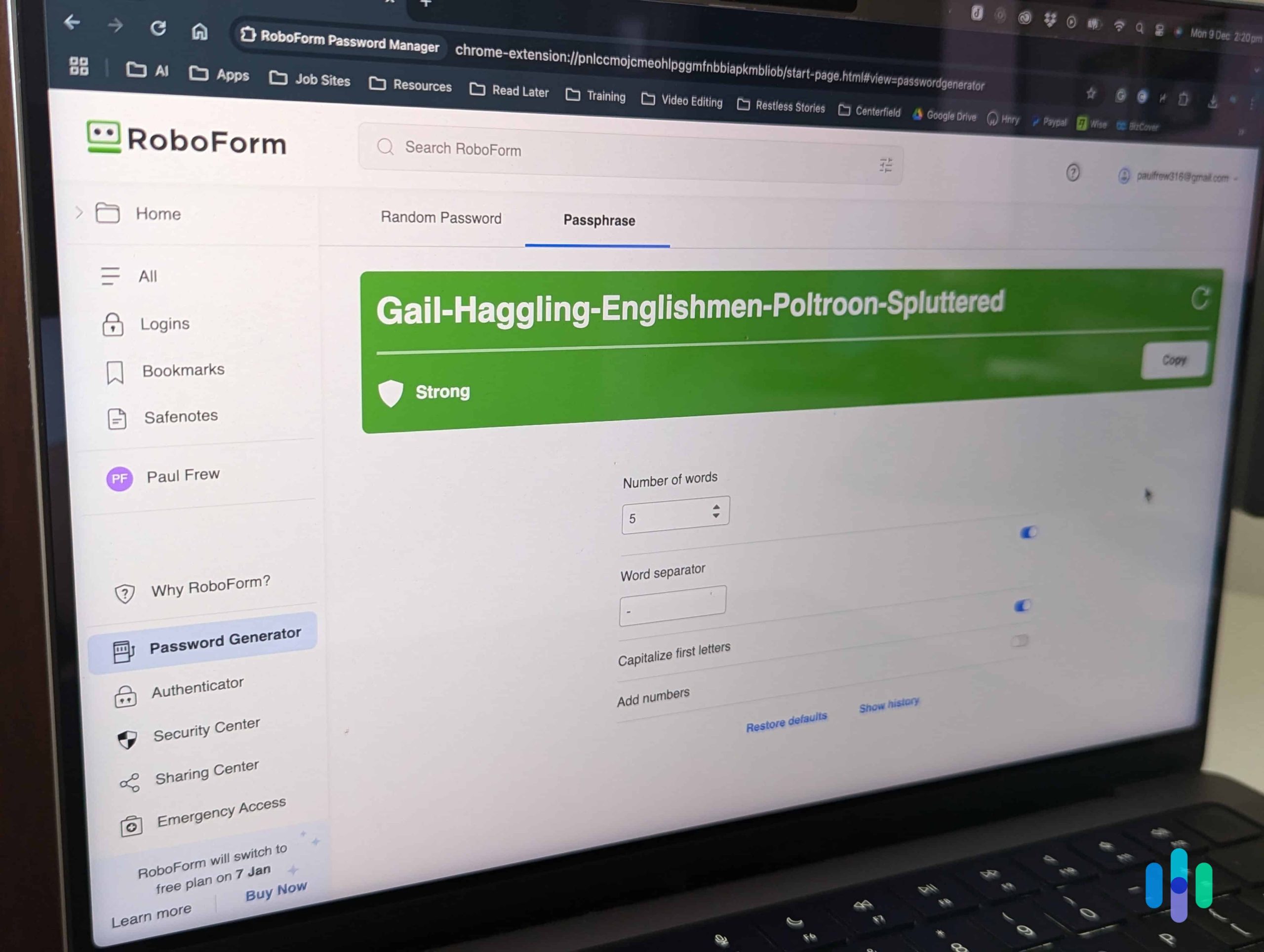
- Utilize password managers to generate and store complex passwords. These tools can create random, complex passphrases that are hard to crack. Popular options such as LastPass, 1Password, and Bitwarden not only store your passwords securely but also help you fill them out automatically when logging into your accounts.
- Implement two-factor authentication (2FA) for an added layer of security. This method typically requires a second piece of information, such as a one-time code sent to your phone, making it significantly harder for intruders to access your accounts even if they have your password.
- Regularly update passwords, particularly for sensitive accounts like banking and healthcare. Establishing a reminder to change your passwords every six months can help fortify your security posture.
The Path Forward
As more of our lives are conducted online, the importance of vigilant password management becomes increasingly clear. Educating oneself about the potential vulnerabilities associated with weak password practices can lead to more informed decisions. Consider embarking on further research, exploring resources that discuss cybersecurity practices, and understanding how to adapt to evolving digital threats.
In sum, safeguarding your online presence is not just about good passwords; it’s about building a culture of security awareness. By adopting strong password management techniques, you can significantly mitigate the risks and protect your most sensitive information from falling into the wrong hands.
DISCOVER MORE: Click here to learn how A/B tests can enhance user experience
Strengthening Your Passwords: Essential Practices
Amid the pervasive threat of cybercrime, implementing effective password management strategies is essential to forging a secure digital life. Security experts emphasize that simply creating strong passwords is not enough; a comprehensive approach is required for ongoing protection. Here are practical strategies that can be integrated into your daily digital activities:
Developing Strong Password Policies
The cornerstone of secure password management lies in the conception of strong, unique passwords. It’s crucial to develop a password creation policy that pinpoints complexity, length, and unpredictability. Below are key components of a robust password policy:
- Length and complexity: Passwords should ideally be at least 12 to 16 characters long and incorporate a mix of uppercase and lowercase letters, numbers, and symbols. A simple guideline is to think of a sentence and transform it into an acronym or replace letters with similar-looking numbers or symbols.
- Avoid personal information: Names, birthdays, or any identifiable information should be avoided in password creation. Cybercriminals often use personal data to facilitate password guessing, making information like a dog’s name or your birth date a risky choice.
- Use passphrases: Instead of traditional passwords, consider using a combination of several words that form a memorable, yet complex passphrase. For example, “RedSky@Sunrise!8*Waves” combines unpredictability with memorability.
Centralizing Management with Password Managers
As the number of applications grows, so does the difficulty of maintaining unique, secure passwords for each. This is where password managers come into play. These tools not only store your passwords securely, but they also allow you to generate new, strong passwords without the hassle of remembering each one:
- Secure storage: Password managers utilize encryption to keep your passwords safe, making it virtually impossible for unauthorized parties to access them.
- Automatic entry: With features such as autofill, password managers can streamline the login process. This reduces the temptation to use less secure passwords for convenience.
- Regular updates: Many password managers will notify you if you have reused a password or if one of your stored passwords has been compromised in a data breach.
The Role of Two-Factor Authentication
To bolster your security further, incorporating two-factor authentication (2FA) into your accounts adds an invaluable layer of protection. 2FA requires users to provide a second form of verification, often a one-time code sent to a mobile device or email, in addition to their password. The effectiveness of 2FA cannot be overstated; even if a password is compromised, unauthorized access remains unlikely without the second factor.
In summary, adopting a layered approach to password management can significantly reduce your susceptibility to cyber threats. By integrating these best practices into your routine and embracing available tools, you’re not just safeguarding your data but actively contributing to a more secure online ecosystem.
| Advantages | Key Features |
|---|---|
| Enhanced Security | Utilizes strong passwords and two-factor authentication to prevent unauthorized access. |
| Convenience | Password managers store and autofill complex passwords, saving time for users. |
| Password Generation | Automatically generates unique and random passwords for each account, enhancing security. |
| Monitoring & Alerts | Provides real-time notifications if suspicious activity is detected on your accounts. |
Adopting strategies for secure password management significantly mitigates the risks associated with data theft and hacking. These methods are paramount, especially given the rising number of cyber threats in today’s digital landscape. By implementing a password manager, users can enhance their defenses against unauthorized access, ensuring that sensitive data remains protected across various applications.Moreover, utilizing features such as two-factor authentication alongside password management further fortifies account security. Password hygiene practices, such as regularly updating passwords and using unique passwords for different accounts, are vital in creating strong barriers against cyberattacks. As these aspects are integrated into your daily online behavior, they not only provide peace of mind but also encourage safer digital practices. Delving deeper into these strategies can uncover additional techniques to strengthen your online security posture.
EXPLORE MORE: Click here to discover how A/B tests can enhance user experience
Enhancing Security Through Awareness and Education
As vital as strong password creation and management tools are, another key aspect of effective password security is user education. No matter how robust your password strategy might be, human error can undermine even the best protections. Cultivating a culture of security awareness can dramatically improve defenses against cyber threats:
Recognizing Phishing Attempts
Phishing is one of the most common tactics used by cybercriminals to steal passwords. Understanding how to recognize a phishing attempt can save individuals from making grave mistakes:
- Inspect URLs and email addresses: Many phishing attempts attempt to mimic legitimate sites or accounts by using slightly altered URLs or email addresses. Always hover over links to verify their origins before clicking.
- Be wary of urgent requests: Scammers often create a sense of urgency, prompting victims to act without thinking. Practicing caution and taking time to verify requests may prevent falling victim to scams.
- Report suspicious activity: Encouraging users to report any suspicious emails or messages can increase the collective knowledge of phishing methods and help in preventing breaches.
Regularly Updating Passwords
Another proactive strategy for secure password management is to develop a habit of regular password updates. While not every application requires frequent changes, certain situations necessitate immediate updates:
- After a security breach: If you learn about a data breach related to a service you use, changing your password immediately is crucial to prevent unauthorized access.
- Routine changes for sensitive accounts: For critical accounts such as banking or healthcare, setting a reminder to change your passwords every 3-6 months can add an extra layer of protection.
Utilizing Security Questions Wisely
When creating an account, many applications require security questions as an additional safeguard. However, users often overlook the potential vulnerabilities associated with these questions:
- Choose obscure answers: Instead of providing information tied closely to personal circumstances (like your mother’s maiden name), consider using a research-based answer that only you would remember, such as the name of your favorite fictional character.
- Use the same level of complexity: Just like passwords, ensure that the answers to security questions are complex and not merely easy-to-guess answers.
Keeping Software Up to Date
Last but not least, keeping software updated is paramount for secure password management. This includes not only operating systems and applications but also password managers themselves:
- Patch vulnerabilities: Regular updates are crucial for ensuring that any security flaws are addressed quickly, reducing the risk of exploitation by hackers.
- Enable automatic updates: Where possible, turn on automatic updates to ensure that you always have the latest security features and patches, minimizing the chances of running outdated software.
Incorporating these additional strategies into your password management practices equips users with diverse tools in their fight against cybercrime. Enhancing awareness about phishing, keeping software up to date, and developing a vigilant approach toward security questions are all essential components of a comprehensive security strategy.
DISCOVER MORE: Click here to learn how A/B tests can enhance user experience
Conclusion: Navigating the Landscape of Secure Password Management
In an increasingly digital world, secure password management has never been more critical. The strategies discussed throughout this article illuminate the various pathways individuals can take to fortify their online presence. From utilizing password managers that can generate inherently complex passwords to understanding the nuances of security questions, users are better equipped to navigate the challenges presented by cyber threats. Regular password updates and a heightened awareness of phishing tactics are foundational aspects that can significantly reduce risks associated with unauthorized account access.
Moreover, the importance of ongoing education in cybersecurity cannot be overstated. Empowering users with knowledge about the evolving landscape of cyber threats is essential for safeguarding personal and sensitive information. Encouraging practices like scrutinizing URLs, being skeptical of urgent requests, and reporting suspicious activity can create a more vigilant online community.
Finally, the technical aspect of maintaining updated software underscores the necessity of a multi-faceted approach towards security. As vulnerabilities are continuously exploited, keeping all systems updated ensures that users utilize the most current protections available. By adopting these comprehensive strategies, individuals will not only strengthen their defenses but also contribute to a culture of security that can protect us all. In the ever-changing realm of digital interactions, informed and proactive password management is key to ensuring a secure online experience.
Related posts:
How to Protect Your Personal Data on Social Media Apps
Cryptography Techniques to Enhance the Security of Your Files in Applications
How to Identify and Avoid Malicious Apps on Your Mobile Device
Tips to Enhance the Security of Your Financial Transactions in Payment Apps
Security Practices to Protect Your Data in Cloud Storage Applications
Security in Finance Apps: How to Protect Your Transactions and Banking Information

Beatriz Johnson is a seasoned tech writer and digital tools expert with a passion for simplifying the complexities of technology and mobile applications. With over a decade of experience in the tech industry, she specializes in topics like productivity apps, software reviews, and emerging digital trends. Through her work, Beatriz empowers readers to make informed technology choices and stay ahead in the ever-changing world of apps and innovation.