How to Protect Your Mobile Devices from Malware in Apps
Understanding Mobile Security Threats
As mobile devices become increasingly integral to our daily routines, the protection of these gadgets transcends mere precaution. Cyber threats, particularly malware, are pervasive and can infiltrate even the most seemingly innocuous applications. The reality is that one click can lead to dire consequences, compromising everything from personal contacts to sensitive financial information.
Vulnerable Apps
Many users often overlook their favorite applications as potential threats. For instance, popular social media or gaming apps, which boast millions of downloads, can be infiltrated by malicious software without immediate detection. One of the most notorious cases was the Joker malware, which slipped into legitimate apps through the Google Play Store, tricking users into unknowingly subscribing to expensive services. This kind of infiltration highlights the importance of scrutinizing app sources and reading reviews before downloading. Security might seem secondary to convenience, yet prioritizing it can safeguard your data.
App Permissions
Another critical factor in mobile security lies in the permissions you grant to your applications. A common scenario is when a seemingly harmless game requests access to your camera or contacts. Such requests can be classified as unnecessary or even invasive. Users should routinely check app permissions on their devices and revoke access that isn’t essential for the app’s functionality. For example, a flashlight app doesn’t need access to your location or personal contacts. Being vigilant about permissions can prevent apps from abusing their access and protect your sensitive data.
Importance of Updates
Software updates are crucial components in the fight against malware. They often include patches that close loopholes which could be exploited by hackers. Failing to update your mobile device promptly after a new version is released can leave your system vulnerable to threats that have already been identified and addressed. In 2021, the Apple security update famously patched a vulnerability that allowed spyware to infiltrate the iPhone, emphasizing the importance of prompt software maintenance. Always enable automatic updates if possible or set a routine reminder to check for updates to keep your device fortified against emerging threats.
As the digital landscape evolves, so too do the tactics employed by cybercriminals. Staying informed about mobile security is not just advisable but essential. By implementing these safeguards and maintaining a proactive approach, you ensure that your personal data remains secure, allowing you to navigate the digital world with confidence. In the forthcoming sections, we will explore more strategies and best practices to fortify your mobile security, providing you with the tools needed to protect your devices effectively. With the right techniques, you can thwart potential risks and enjoy a more secure mobile experience.

DIVE DEEPER: Click here to discover how A/B tests can enhance user experience
Essential Strategies for Malware Prevention
Protecting your mobile device from malware embedded in apps requires a multifaceted approach. The more proactive you are in securing your digital environment, the less likely you are to fall victim to malicious software. Here are several strategic actions that can empower you to safeguard your mobile experience:
Download Apps from Trusted Sources
The first line of defense against malware is ensuring that you download applications from reputable and verified sources. Stick to official app stores such as Google Play for Android users and the Apple App Store for iOS users. These platforms have stringent approval processes designed to vet apps for security risks. While it’s tempting to sidestep these measures for the sake of novelty or niche applications, such actions significantly boost your risk of exposure to malware.
Utilize Mobile Security Software
Just like your PC, your mobile device can benefit from security software that helps detect and neutralize malware threats. Investing in a reliable mobile security application provides an extra layer of protection and may include features such as:
- Malware Scanning: Regularly scans your apps and files to detect malicious software.
- Real-Time Protection: Monitors downloads and app installations to warn you of potential threats.
- Privacy Protection: Alerts you to any unauthorized access to your personal data.
When selecting a security application, opt for those with good reviews and a proven track record. Some commonly recommended options include Norton, McAfee, and Bitdefender.
Be Wary of Public Wi-Fi
Using public Wi-Fi can open up your device to potential malware attacks. Cybercriminals often set up rogue networks that mimic legitimate public Wi-Fi spots. By connecting to these networks, you inadvertently provide access to your data. Always proceed with caution when connecting to public Wi-Fi by:
- Using a Virtual Private Network (VPN) to encrypt your internet connection.
- Avoiding sensitive transactions, such as online banking or shopping, when connected to unsecured networks.
- Disabling automatic connection to unfamiliar Wi-Fi networks in your settings.
Educate Yourself on Phishing Scams
Phishing scams often serve as gateways for malware installation. Recognizing suspicious emails, texts, or messages that attempt to lure you into downloading harmful apps is crucial for your security. Attackers may pose as trusted organizations to manipulate you into providing sensitive information or clicking on malicious links. Always double-check the sender’s information and avoid engaging with questionable communications. Keeping yourself informed about common phishing tactics can dramatically reduce your vulnerability.
In summary, a combination of cautious downloading habits, mobile security software, safe use of Wi-Fi, and awareness of phishing scams forms a robust defense against malware threats. As cyber threats continue to evolve, so should your approach to mobile security, allowing you to navigate the digital landscape with greater confidence.
Top Strategies to Safeguard Your Mobile Devices
When it comes to mobile safety, vigilance is key. Protecting your mobile devices from malware in apps involves a combination of smart practices and technological tools. Here, we delve into some essential strategies to safeguard your devices.
1. Download Apps from Trusted Sources
Always opt to download apps from official sources like the Apple App Store or Google Play Store. These platforms have rigorous safety checks in place. Apps available on third-party sites may not undergo thorough scrutiny, which increases the risk of malware infections.
2. Regularly Update Your Apps and OS
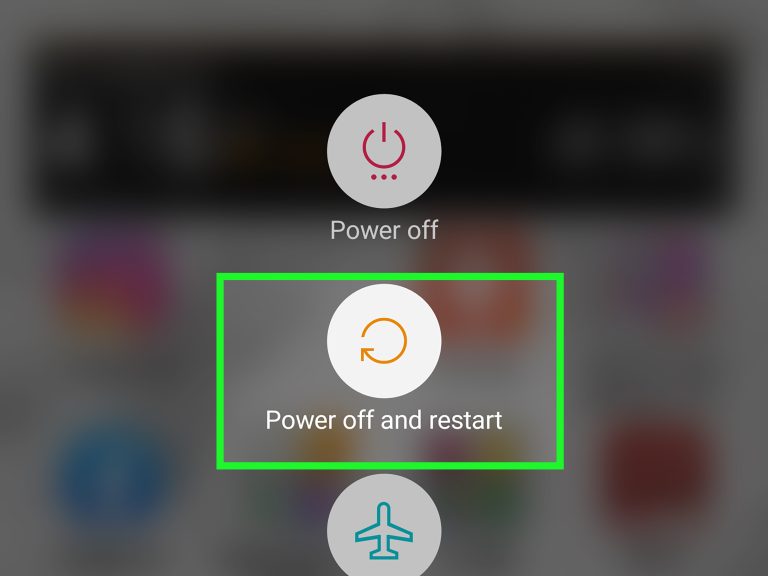
Keeping your operating system and applications updated is vital. Software updates often contain security patches that fix vulnerabilities and protect against potential threats. Set your device to update automatically to ensure you don’t miss critical security enhancements.
3. Check App Permissions
Revisit the permissions you’ve granted to your downloaded apps. If an app asks for more permissions than necessary, consider it a red flag. For example, a simple game should not require access to your contacts or messages. Monitoring permissions helps to limit the amount of data that could be compromised.
4. Use Security Software
Utilizing a reputable mobile security application provides an extra layer of defense against malware. Look for features such as real-time scanning, anti-theft measures, and web protection to ensure comprehensive security.
5. Avoid Public Wi-Fi for Sensitive Transactions
Public Wi-Fi networks are often less secure, making your device vulnerable to attacks. Avoid logging into bank accounts or entering sensitive information while connected to such networks. If necessary, use a reliable virtual private network (VPN) to encrypt your connection.
6. Stay Informed About Current Threats
Education is a powerful tool against malware. Stay updated on common threats and emerging tactics used by cybercriminals. Being aware allows you to act proactively and avoid falling victim to scams or harmful applications.
7. Enable Two-Factor Authentication (2FA)
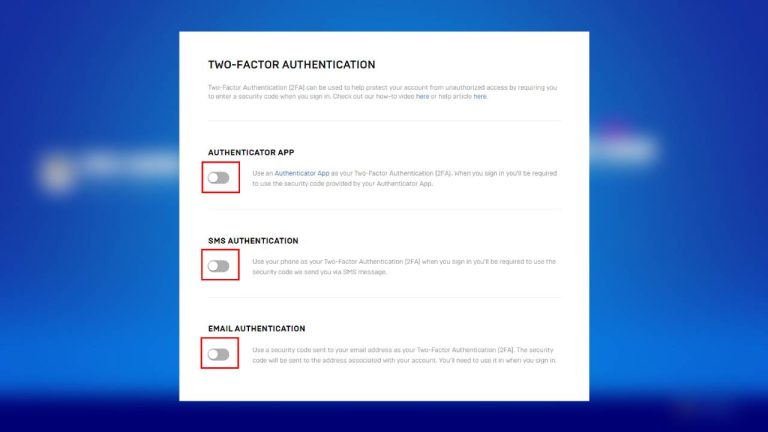
Two-factor authentication adds an additional security layer by requiring not only your password but also a second form of verification. This could be a code sent to your phone or an authentication app. Enabling 2FA significantly reduces the likelihood of unauthorized access to your accounts.To further enhance your understanding of mobile safety, consider incorporating educational resources and engaging with communities dedicated to cybersecurity. The more knowledge you gain, the better equipped you will be to protect your mobile devices against potential threats.
| Category | Advantages |
|---|---|
| Trusted App Sources | Reduces malware risk by ensuring quality control |
| Regular Updates | Keeps software secure against known vulnerabilities |
By adopting these practices, you can significantly enhance the security of your mobile devices, making them less vulnerable to malware and other cyber threats.
DISCOVER MORE: Click here to learn how A/B tests can elevate your app’s user experience
Advanced Techniques for Enhanced Mobile Security
As we navigate the interconnected world on our mobile devices, staying informed about evolving threats and implementing enhanced security measures is vital. With malware trends continually adapting, awareness and proactive steps can significantly mitigate risks. Here are additional techniques to further protect your mobile devices from malware hidden in apps:
Keep Your Device and Apps Updated
One of the simplest yet most effective ways to protect your device from malware is to keep your operating system and applications up to date. Software developers frequently release updates that patch vulnerabilities and enhance security measures. Only a small percentage of mobile users in the U.S. take advantage of these updates regularly, leaving their devices susceptible to known exploits. Set your mobile device to automatically download updates whenever they become available, ensuring that all of your apps and system software are protected.
Review App Permissions Carefully
Prior to downloading or installing an app, it’s essential to review its permissions. Many applications request access to sensitive data and device features that may not be necessary for their core functionality. For instance, a simple flashlight app should not require access to your contacts or location information. If you encounter an app seeking excessive permissions, think twice before proceeding with installation. Always opt for apps that request only what is essential for their operation, as this reduces the chances of unwarranted data access.
Disable Unknown Sources
To add another layer of protection, it’s advisable to disable the option to install apps from unknown sources. While this feature may enable convenient downloads of third-party applications, it also heightens your susceptibility to malware. In Android devices, navigate through Settings to find the “Install Unknown Apps” option and ensure that it is disabled for all browsers and email apps. By narrowing where your apps can come from, you bolster your defenses against malicious software.
Activate Two-Factor Authentication (2FA)
Two-factor authentication is an excellent way to enhance your security against unauthorized access, particularly for sensitive applications. Many financial services and online platforms now offer 2FA, which requires an additional verification step beyond username and password. This could be a code sent via SMS or an authentication app. By enabling this feature, you can significantly decrease the risk of malware gaining access to your accounts, even if your login information is compromised.
Regularly Review and Clean Your Device
Performing routine check-ups on your device can help identify and eliminate potential malware. Make it a habit to regularly review installed applications and remove any that you no longer use or recognize, especially those downloaded from unofficial sources. Additionally, consider utilizing built-in device management tools that many smartphones offer, which can help clear cache data and free up space—leading to improved performance and reducing potential malware landscape.
As digital threats continue to proliferate, being proactive about your mobile security is essential. Taking these advanced steps and maintaining vigilance can make all the difference in protecting your mobile device from rampant malware in apps, ultimately allowing for a safer browsing experience.
DISCOVER MORE: Click here to enhance your app’s UX
Conclusion: Strengthening Your Mobile Defense Against Malware
In an age where mobile applications have become integral to our everyday lives, prioritizing security has never been more crucial. As highlighted in this article, the risks associated with malware in apps can be mitigated through a combination of awareness and proactive measures. Keeping your device and applications updated, reviewing app permissions, and disabling installations from unknown sources are fundamental steps that empower users against evolving threats. Additionally, activating two-factor authentication adds an essential layer of security to sensitive accounts, further safeguarding your personal information.
Moreover, regularly auditing your installed apps and maintaining a clean device are practices that contribute to overall device health and security. As new types of malware emerge, so should your knowledge and response strategies. With recent statistics indicating that a staggering number of mobile users remain oblivious to security updates, it’s crucial to stay informed and adaptable. In the fast-paced digital landscape of the United States, taking a proactive approach not only leads to improved security but enhances your overall user experience.
Moving forward, consider educating yourself on the latest cybersecurity trends and remaining vigilant about app sources before downloading. By making these efforts, you not only protect your own device but contribute to a safer mobile environment for all. In this ongoing battle against malware, knowledge is as powerful as technology—stay informed, stay secure, and enjoy the benefits of your mobile devices without the looming threat of malware.
Related posts:
Cryptography Techniques to Enhance the Security of Your Files in Applications
How to Protect Your Personal Data on Social Media Apps
The Importance of Two-Factor Authentication in Popular Apps
The Role of Security Updates in Protecting Applications and Devices
Tips to Enhance the Security of Your Financial Transactions in Payment Apps
How to Protect Your Personal Data on Social Media Apps

Beatriz Johnson is a seasoned tech writer and digital tools expert with a passion for simplifying the complexities of technology and mobile applications. With over a decade of experience in the tech industry, she specializes in topics like productivity apps, software reviews, and emerging digital trends. Through her work, Beatriz empowers readers to make informed technology choices and stay ahead in the ever-changing world of apps and innovation.