How to Identify and Avoid Malicious Apps on Your Mobile Device
Understanding the Peril of Malicious Apps
As we navigate the digital landscape, the convenience of mobile applications cannot be overstated. These applications not only help us connect with friends, manage our finances, and entertain ourselves, but they also hold vast amounts of personal data. However, with this convenience comes risk. Malicious apps are increasingly prevalent, aiming to exploit unsuspecting users. Recognizing the characteristics of these apps can help protect your personal information and maintain a secure digital environment.
Identifying Red Flags
When it comes to identifying potentially harmful apps, awareness is your strongest ally. Some key indicators can signal that an app may not be safe for download:
- Unusual Permissions: Many harmful applications will request permissions that are not relevant to their functionality. For example, a simple flashlight app asking for access to your contacts or location is a significant warning sign. It’s essential to scrutinize these requests closely before giving apps access to sensitive information.
- Poor Reviews: User ratings can provide invaluable insight into an app’s reliability. A plethora of negative reviews, particularly mentioning issues like data breaches or malware, should raise immediate concerns. Users often share their experiences with malicious apps, which can serve as a cautionary tale for others.
- Unknown Developers: Applications developed by companies or individuals with little to no digital footprint can be suspicious. Always conduct a background check on the developer. Established companies are likely to have a reputation to uphold, while unknown developers may have ulterior motives.
The Consequences of Malicious Apps
The stakes are high when it comes to downloading questionable applications. The repercussions for falling victim to a malicious app can be severe:
- Data Theft: One of the foremost risks is unauthorized access to your personal information. This can include sensitive data such as credit card numbers, social security information, and private communications. Misuse of this information can lead to identity theft, putting financial security at risk.
- Device Sluggishness: Harmful apps can negatively impact your device’s performance, leading to unexpected crashes or noticeably slower operation. Users may find themselves battling constant pop-ups or reeling from a battery that drains at alarming rates.
- Increased Bills: Many malicious apps employ tactics to charge users for premium services without their consent, resulting in unexpected charges on phone bills or in-app purchases that go unnoticed until it’s too late.
Staying Informed and Safe
Given that digital threats are constantly evolving, it is crucial to stay educated on how to spot and evade malicious applications. Using resources like app review sites, security tools, and operating system updates can go a long way in fortifying your defenses against potentially harmful apps. Ensuring you have reliable antivirus software installed and keeping your device’s OS updated can also act as a protective barrier against threats.
In conclusion, encountering malicious apps can be a daunting experience, but by maintaining vigilance and adopting a proactive approach, you can safeguard your digital life. Staying informed about the signs of such apps is the first step in creating a secure mobile environment.
DISCOVER MORE: Click here to enhance your app experience
Essential Strategies for Identifying Malicious Apps
As our reliance on mobile devices continues to grow, so does the presence of malicious apps that threaten our privacy and security. Understanding how to identify these harmful applications is the first step toward protecting your device and personal data. Here are essential strategies to help you discern legitimate apps from potentially dangerous ones.
Scrutinize App Sources
The source from which you download apps carries significant weight in determining their safety. Stick to established app stores such as the Apple App Store or the Google Play Store. These platforms employ strict vetting processes to minimize the prevalence of malicious apps. However, even within these stores, vigilance is crucial. Take the time to research any app before downloading it, and avoid third-party app stores that often lack rigorous security checks. This simple habit can drastically reduce your risk.
Examine App Details Carefully
Before installing any application, it’s vital to examine the app’s details closely. Pay attention to the following:
- Developer Name: Look for reputable developers with a history of quality apps. An app with little information about its creator or one that seems completely anonymous should raise red flags.
- Update Frequency: A well-maintained app will usually have regular updates. If an app hasn’t been updated in a long time, it could indicate neglect or that the app has been abandoned, making it a potential target for exploitation.
- Number of Downloads: Apps that have garnered millions of downloads and positive user experiences are often more trustworthy. Exercise caution if the app in question has high ratings but has not been downloaded frequently.
Be Wary of “Too Good to Be True” Offers
Malicious apps often lure users with enticing promises, such as free premium content, access to subscription services without payment, or extraordinarily high rewards for minimal effort. If an app offers something seemingly irresistible, it’s wise to question its legitimacy. Genuine apps usually maintain transparency regarding their services and will not employ deceptive tactics to entice users. Always remember that if an offer sounds too good to be true, it probably is.
Keep Your Biometrics and Account Information Secure
Regardless of how careful you are, it’s paramount to secure your data actively. Utilize the security features available on your device, such as biometric authentication (fingerprint sensor or facial recognition). These features create additional barriers against unauthorized access to sensitive information. Additionally, consider enabling two-factor authentication for your accounts, particularly for any apps that handle financial transactions or personal data.
By applying these strategies, you can significantly lower your chances of falling victim to malicious apps. In an era when smartphone usage is ubiquitous, understanding how to navigate potential threats is essential. Through diligence and informed decision-making, you can enjoy the many benefits of mobile applications while keeping your information secure.
| Risk Factors | Identifying Malicious Apps |
|---|---|
| Unrecognized Developer | Always check the developer’s name. Reputable developers have established records. |
| Permissions Overreach | Look for apps requesting more permissions than necessary. Too many permissions can indicate malicious intent. |
| Poor Reviews | Check user reviews for mentions of malware. Consistent complaints should raise flags. |
| Unknown Sources | Avoid downloading from third-party websites. Stick to official app stores for safety. |
Malicious apps pose significant threats to mobile users, expanding rapidly with technological advancements. Understanding the risk factors associated with mobile applications is crucial. Recognizing unrecognized developers is one of the first steps in safeguarding your device. Always ensure the applications you download are from developers with a good reputation, as this can help avoid potential malware risks.Similarly, an application requiring an excessive number of permissions is often a red flag. For instance, a simple wallpaper application should not need access to your contacts or microphone. Paying close attention to user reviews also plays a pivotal role in your defense strategy. Frequently occurring mentions of malware or other suspicious activities in user reviews may indicate the app’s questionable nature.Additionally, be cautious about installing apps from unknown sources. Always download applications directly from official app stores, where rigorous checks are conducted to minimize risks. By being vigilant and educated, you can effectively identify and avoid malicious apps, ensuring a safer mobile experience.
DISCOVER: Click here to learn how A/B tests can enhance user experience
Protective Measures to Avoid Malicious Apps
Once you have developed the skills necessary to identify potentially harmful applications, the next step is to implement effective protective measures to further shield your mobile device from malicious apps. By following these guidelines, you can significantly mitigate the risks associated with mobile app usage and enhance your overall digital security.
Utilize Mobile Security Apps
In addition to your device’s built-in security features, consider investing in reliable mobile security applications. These tools can actively scan your device for malicious apps, detect malware, and continuously monitor your device for any suspicious behavior. Many reputable brands offer security solutions designed specifically for mobile devices, often including features such as safe browsing, remote wipe, and app privacy checks. Regularly updating and running these security applications helps ensure your device remains fortified against emerging threats.
Review Permissions with a Critical Eye
When installing a new app, it is essential to carefully review the permissions that the app requests. Many legitimate apps ask for access to certain features of your device, such as your location or camera. However, if an app requests permissions that seem excessive or unrelated to its functionality, this might be a cause for concern. For example, a simple flashlight app should not require access to your contacts or location. Always scrutinize permissions and opt for apps that limit their access to only what is necessary for functionality.
Stay Informed about Security Threats
Staying informed about the latest mobile security threats is crucial in navigating the digital landscape. Regularly reading articles from reputable tech websites or following cybersecurity blogs can help you stay up-to-date on the vulnerabilities associated with popular apps and emerging malicious trends. The Federal Trade Commission (FTC) and other cybersecurity organizations often release bulletins that provide essential information regarding current threats or specific apps known to be hazardous. Taking the time to educate yourself can empower you to make more informed decisions regarding your app usage.
Implement Regular Device Updates
Software updates often include critical security patches that can protect your device against vulnerabilities that malicious apps might exploit. Always ensure that your device’s operating system, as well as all installed applications, are up-to-date. In many cases, attackers look for systems running outdated software, as these are easier to infiltrate. Activating automatic updates can help streamline this process, ensuring that you won’t overlook essential updates that could bolster your device’s security.
Consider a Factory Reset in Suspicious Situations
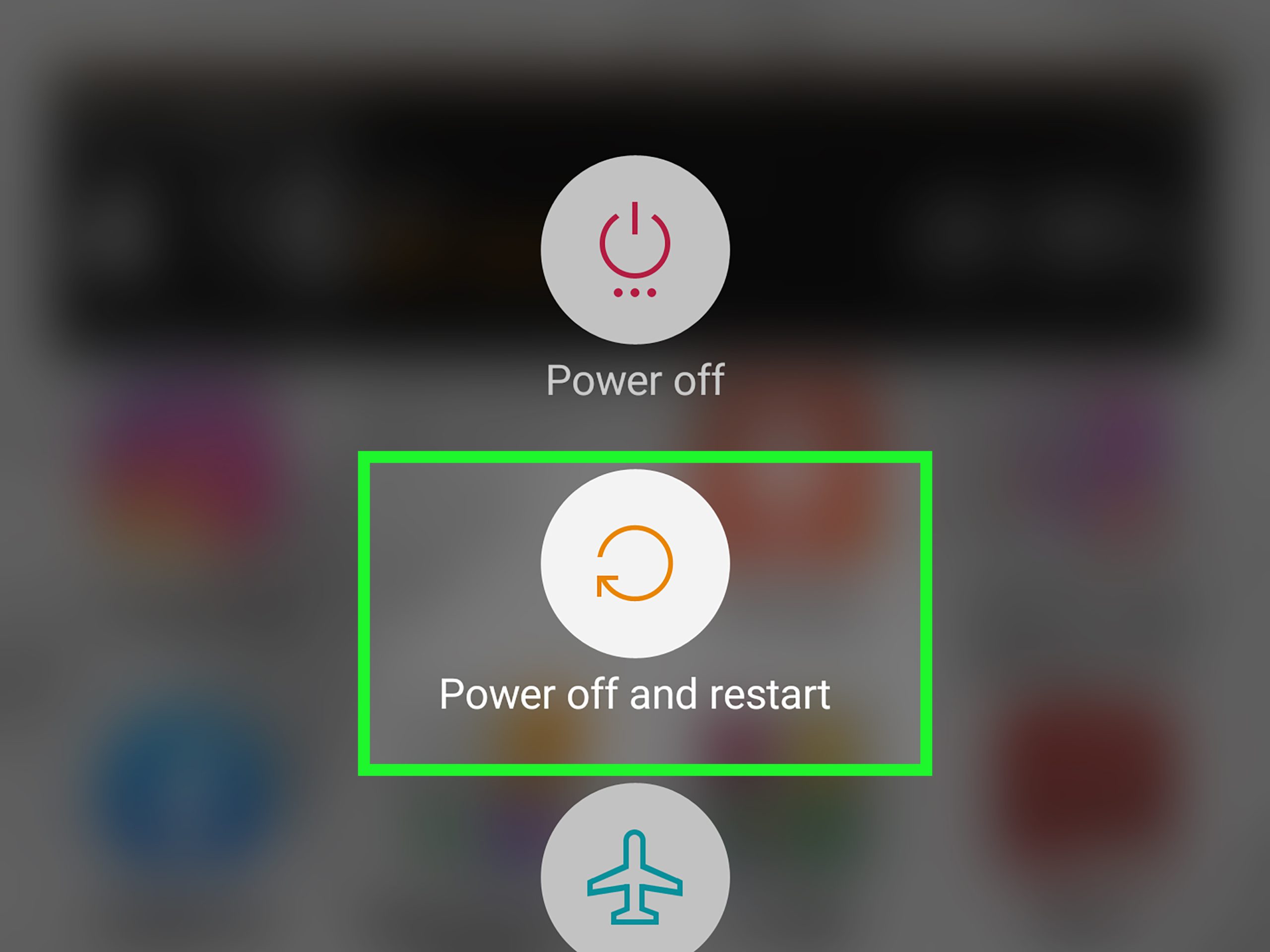
In extreme cases where you suspect that your device has become compromised, performing a factory reset can be a vital step to reclaim security. This process restores your device to its original settings and removes all downloaded apps, including any malicious ones. However, this should be considered a last resort, as it results in the loss of personal data and requires reinstalling applications. Before proceeding, always back up important files and data to ensure nothing significant is lost.
By implementing these protective measures, you can bolster your defenses against malicious apps and safeguard your personal data. With consistent diligence and proactive behavior, you’ll be better equipped to navigate the myriad of applications available today while maintaining your mobile security.
DIVE DEEPER: Click here to discover how A/B tests can transform your app’s user experience
Conclusion
In a world where our mobile devices serve as gateways to a multitude of services and personal information, understanding how to identify and avoid malicious apps is paramount for maintaining your digital security. By arming yourself with knowledge and adopting a proactive approach, you can significantly reduce the risks associated with malicious applications.
First and foremost, recognizing suspicious app behavior is crucial. Look out for applications that request excessive permissions or exhibit unusual activity. Additionally, leveraging mobile security applications can provide an added layer of protection, ensuring your device is frequently scanned for vulnerabilities. Staying informed about the latest threats through reputable sources, like the Federal Trade Commission or trusted tech blogs, prepares you to make informed decisions in an ever-evolving digital landscape.
Moreover, regular updates are essential to safeguarding your device from newly discovered exploits. Whether it’s the operating system or installed applications, keeping everything up-to-date can thwart potential malicious attacks. And in dire situations where compromise is suspected, a factory reset can restore your device to a secure state, yet it should be approached with caution.
Ultimately, the ability to identify and mitigate threats from malicious apps is rooted in vigilance, education, and proactivity. By incorporating these protective measures into your mobile usage routine, you will not only enhance your own security but also contribute to a more secure digital environment for everyone. With continued diligence, you can traverse the expansive app ecosystem confidently, safeguarding your personal data and ensuring your mobile experience remains enjoyable and secure.
Related posts:
Safety Tips for Using Cloud Storage Applications
How to Protect Your Personal Data on Social Media Apps
Strategies for Secure Password Management in Various Applications
Best Password Practices: How to Create and Manage Strong Passwords in Apps
The Importance of Two-Factor Authentication in Popular Apps
How to Set Up Security Alerts in Online Shopping Apps

Beatriz Johnson is a seasoned tech writer and digital tools expert with a passion for simplifying the complexities of technology and mobile applications. With over a decade of experience in the tech industry, she specializes in topics like productivity apps, software reviews, and emerging digital trends. Through her work, Beatriz empowers readers to make informed technology choices and stay ahead in the ever-changing world of apps and innovation.