Best Password Practices: How to Create and Manage Strong Passwords in Apps
The Importance of Password Security in the Digital Age
In today’s fast-paced digital landscape, where almost every transaction and interaction happens online, password security has escalated from a mere convenience to an absolute necessity. Every month, millions of Americans engage in online banking, social media networking, and e-commerce, often without fully grasping the significant risks involved in poor password management. It’s startling to realize that countless individuals still fall prey to common security missteps that can lead to severe repercussions, including identity theft and financial loss.
Essential Password Practices to Enhance Security
To protect your sensitive information, adopting robust password practices is crucial. Here are some fundamental steps to consider:
- Use a mix of characters: Crafting a password that incorporates upper and lower case letters, numbers, and symbols not only makes it complex but also significantly harder for hackers to crack. For example, instead of using “password123,” consider a more intricate arrangement like “P@ssW0rd!23#”.
- Avoid personal information: Relying on personal data like your name, birthdate, or pet’s name can be a grave mistake, as these details are often available on social media or public records. When creating a password, aim for anonymity by using random words or phrases rather than anything personally identifiable.
- Length matters: Security experts recommend that passwords be at least 12-16 characters long. The longer the password, the exponentially more challenging it becomes for anyone attempting unauthorized access.
The Role of Password Management in Security
Simply creating strong passwords isn’t enough. Effective management of these passwords is critical for sustaining security. Consider the following strategies:
- Utilize password managers: These digital tools can generate, store, and auto-fill complex passwords across various sites, reducing the likelihood of reusing passwords across multiple accounts. Leading password managers like LastPass or 1Password not only simplify the password creation process but also protect you from potential breaches by ensuring no two accounts share the same login credentials.
- Enable two-factor authentication: This additional layer of security requires not just a password but also a secondary verification method, such as a text message or biometric scan. This means that even if your password is compromised, unauthorized users would still face hurdles accessing your accounts.
- Regularly update your passwords: Changing your passwords every few months can mitigate the risk of an old password being exploited. If you receive notice of a data breach from any service you use, prioritize updating your passwords for those specific accounts.
By implementing these best password practices, you can dramatically reduce the chances of falling victim to cyber threats. Protecting your digital life starts with being proactive about your password strategies. In the continuing evolution of technology, remaining informed about effective password creation and management is pivotal to safeguarding your personal data. As we delve further into effective strategies for creating and managing strong passwords, especially for apps, you’ll discover additional tips to enhance your security measures.
DON’T MISS: Click here to learn how A/B tests can enhance your app’s user experience
Creating Strong Passwords: The Foundation of Security
When it comes to safeguarding your online accounts, strong passwords serve as the first line of defense against cyber threats. However, creating effective passwords goes beyond simply adding a few random characters. It requires a strategic approach that combines complexity, unpredictability, and relevance. Understanding the vital components of what makes a password strong is essential for anyone looking to enhance their digital security.
Key Characteristics of Strong Passwords
To craft a password that can withstand various hacking techniques, consider the following characteristics:
- Complexity is Key: Passwords should be a blend of uppercase and lowercase letters, numbers, and special characters. This complexity increases the number of possible combinations, making it significantly more challenging for cybercriminals to crack your password through brute-force attacks. For tissue, instead of “securepassword,” use something like “S3cur3!P@ssw0rd#2023.”
- Avoid Sequences and Common Words: Refrain from using easily guessable patterns, such as “123456” or “qwerty”. Such combinations often appear in the first wave of attempts by hackers. Opt for random phrases or a series of unrelated words—for instance, “BlueSky!7Dance#Forest.”
- Passphrases: Consider using a passphrase instead of a traditional password. A passphrase can be a longer string of words that create sentences, making it easier for you to remember but still challenging for others to guess. For example, “MyDogWatchesTheStars@Night!” not only meets the complexity criteria but is also memorable.
By incorporating these elements into your password creation process, you lay a solid groundwork for protecting your online identity. It’s crucial to recognize that no password is completely foolproof, but applying these principles can significantly decrease the likelihood of unauthorized access.
The Challenges of Multiple Passwords
In the era of digital convenience, where one can find themselves registering for multiple accounts across various platforms, managing numerous strong passwords presents a substantial challenge. Many individuals resort to reusing passwords across different applications, inadvertently increasing their vulnerability. This repetition can be dangerous; if one account gets compromised, others become at risk as well. Hence, it becomes essential to strategize password management effectively.
Next, we will explore how leveraging technology, such as password managers, can streamline the management of your passwords and elevate your security efforts. With a password manager, you can safely store, generate, and retrieve complex passwords without the burden of memorizing each one. This not only enhances your security but also ensures you can maintain the best practices mentioned earlier with ease.
| Category | Key Features |
|---|---|
| Use of Password Managers | Password managers generate and store unique, complex passwords for each app, eliminating the need to remember them all. |
| Multi-Factor Authentication (MFA) | An extra layer of security that requires a second verification step, significantly reducing the risk of unauthorized access. |
| Regular Updates | Changing passwords periodically helps combat potential breaches and ensures security is maintained over time. |
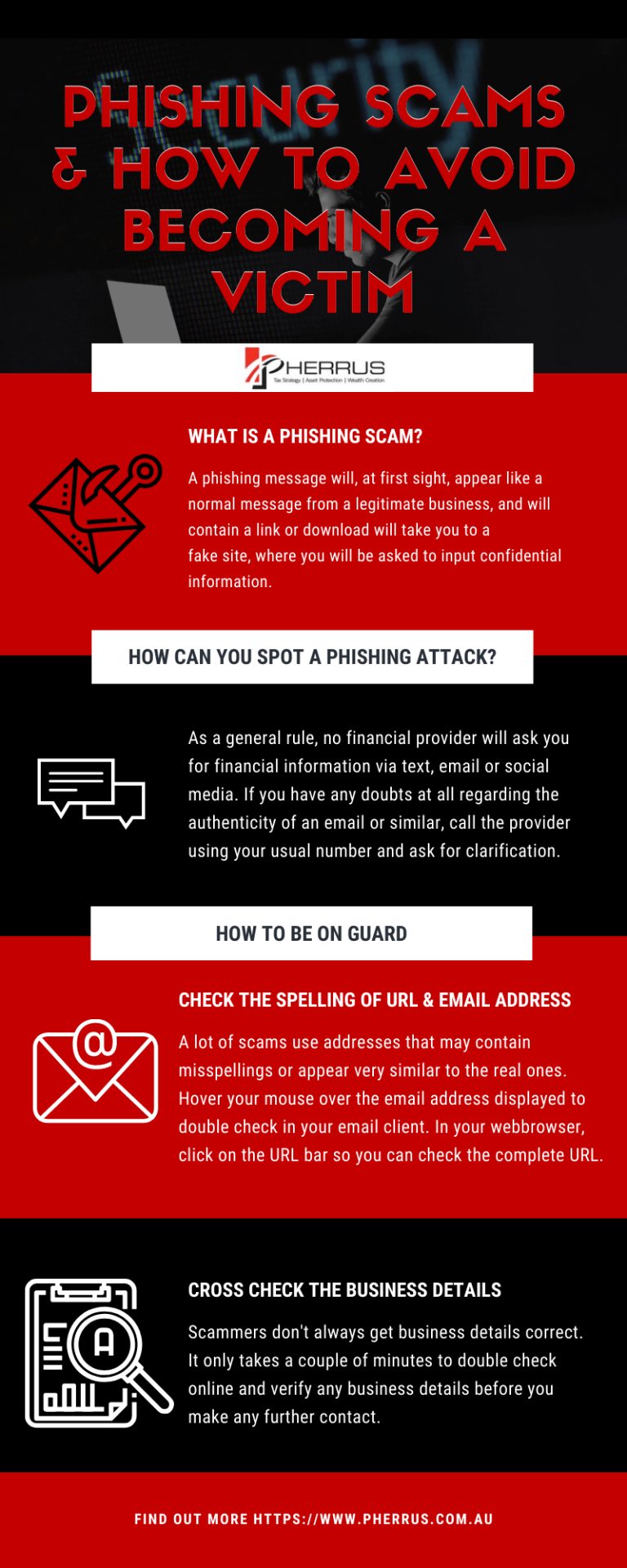
| Awareness of Phishing | Staying informed about phishing scams aids in recognizing and avoiding potential threats to password security. |
As the digital landscape evolves, so do the techniques used by cybercriminals. Therefore, implementing these strong password practices is crucial not only for personal security but also for the safety of sensitive information stored within applications. By using tools like password managers, individuals can enhance their ability to create and manage robust passwords, which is a pivotal factor in safeguarding against data breaches. Integrating multi-factor authentication adds a formidable layer, making it increasingly difficult for intruders to gain unauthorized access. Thus, the alignment of these strategies not only fortifies your digital life but also empowers you to navigate the app ecosystem with confidence and peace of mind. Staying vigilant and well-informed about phishing attacks will further bolster your defense, making comprehensive password management an indispensable skill in today’s tech-savvy world.
DISCOVER MORE: Click here to learn about A/B testing benefits
Utilizing Technology for Password Management
In a world where online security is paramount, the right tools can significantly enhance your password management strategy. As mentioned earlier, password managers emerge as a robust solution, offering a range of features that simplify the creation, storage, and retrieval of passwords.
The Benefits of Password Managers
Password managers not only help in generating strong passwords; they also store them securely, allowing users to access their accounts with just one master password. Here are some compelling reasons to consider integrating a password manager into your security practices:
- Ease of Use: Password managers streamline the process of logging into multiple accounts. Most password managers can automatically fill in login forms, saving users time while reducing the chances of entering incorrect credentials.
- Strong Password Generation: With built-in tools, many password managers can create highly complex and unique passwords that adhere to strength requirements, effectively mitigating the risk of account breaches.
- Cross-Device Synchronization: Whether you access your accounts on a smartphone, tablet, or desktop, many password managers allow you to synchronize your passwords across devices securely. This ensures you always have your credentials at your fingertips, no matter where you are.
- Enhanced Security Features: Password managers often come equipped with features like two-factor authentication (2FA), which adds an extra layer of security. This means even if someone were to obtain your master password, two-factor authentication acts as a roadblock to accessing your accounts.
Given the increasing rate of data breaches—recent reports indicate that over 60% of Americans have been affected by some form of a data breach—using a password manager is not just convenient; it’s a necessary step in elevating your security measures.
Best Practices for Using a Password Manager
While password managers can significantly bolster your security, it is essential to utilize them effectively. Here are a few best practices for maximizing the effectiveness of your password manager:
- Choose a Reputable Password Manager: Not all password managers offer the same level of security. Opt for services that provide strong encryption, transparent security practices, and routine audits. Popular options in the U.S. include LastPass, Dashlane, and 1Password.
- Use Strong Master Passwords: Remember that the security of your password manager hinges on the strength of your master password. It should be unique, complex, and ideally among the best password practices outlined earlier.
- Regularly Update Your Vault: Consider routinely reviewing and updating the passwords stored within your password manager. Identify any accounts that are no longer in use and delete them to minimize vulnerabilities.
- Enable Security Alerts: Many password managers offer alerts if your stored passwords may have been compromised in a data breach. Monitoring these notifications can help you respond quickly to potential threats.
As the cyber threat landscape continues to evolve, staying abreast of the latest security measures is vital for individuals and organizations alike. By leveraging technology like password managers and adhering to best password practices, you can substantially reduce the risks associated with online accounts, leading to a safer digital experience.
DISCOVER MORE: Click here to learn how A/B tests can elevate your app’s user experience
Conclusion: Fortifying Your Digital Security
In an age where our lives are increasingly intertwined with digital platforms, prioritizing strong password practices has never been more crucial. Throughout this article, we’ve highlighted the importance of not only creating complex passwords but also managing them effectively. The emergence of password managers has revolutionized the way we approach password security, offering automated solutions that ease the burden of remembering multiple credentials while enhancing security.
As cyber threats continue to evolve with alarming velocity, the necessity for robust security measures cannot be overstated. Utilizing reputable password managers is a proactive step to safeguard your sensitive information, reducing the likelihood of falling victim to data breaches that currently affect over 60% of Americans. Best practices such as choosing strong master passwords, regularly updating your vault, and enabling security alerts are pivotal in maximizing your defenses.
Ultimately, the responsibility lies with each individual to adopt a comprehensive strategy that incorporates the latest tools and best practices in password management. By doing so, you not only protect your digital assets but also contribute to a broader culture of security awareness. Embracing these practices ensures a safer experience in our interconnected world, allowing you to navigate your online activities with confidence.
So, take charge of your online security today—your future self will thank you.
Related posts:
How to Choose Apps with Transparent and Secure Privacy Policies
How to Protect Your Personal Data on Social Media Apps
How to Protect Your Mobile Devices from Malware in Apps
How to Protect Your Data in Health and Wellness Apps
How to Identify and Avoid Malicious Apps on Your Mobile Device
The Role of Security Updates in Protecting Applications and Devices

Beatriz Johnson is a seasoned tech writer and digital tools expert with a passion for simplifying the complexities of technology and mobile applications. With over a decade of experience in the tech industry, she specializes in topics like productivity apps, software reviews, and emerging digital trends. Through her work, Beatriz empowers readers to make informed technology choices and stay ahead in the ever-changing world of apps and innovation.