What to Do When a Software Update Causes Problems on Your Device
Understanding Software Update Issues
In today’s world, where technology is deeply integrated into our daily lives, software updates are a double-edged sword. On one hand, these updates are critical for maintaining and improving function, security, and user experience. On the other, they can introduce unexpected complications that can disrupt our routines. Users across the United States often find themselves grappling with these issues after installing the latest updates on their smartphones, tablets, or laptops.
Some common problems that may arise post-update include:
- System Crashes: Imagine you’ve just updated your operating system, only for your device to freeze or crash while you are in the middle of an important task. Such disruptions not only cause immediate annoyance but can also lead to data loss if unsaved work is involved.
- Compatibility Issues: After a software update, some apps may no longer function as intended. This can be particularly troublesome for users who rely on specific applications for daily tasks, such as business professionals who depend on productivity tools or students using educational software.
- Performance Sluggishness: Many users report that their devices feel slower after updates, leading to longer loading times and frustrating delays. This latency can significantly affect user experience, particularly for those who utilize their devices for gaming, streaming, or graphic-intensive applications.
Statistical data reveals that a significant number of Americans encounter challenges following software updates. According to a survey conducted by a tech support company, nearly 60% of users reported experiencing at least one issue due to an update within the past year. Such findings highlight a prevalent concern that warrants attention.
Knowing how to respond when these problems arise can save users much time and anxiety. There are several actionable steps that one can take to cope with these software-related issues. For example, rolling back to an earlier version of the software may resolve compatibility problems, while clearing the cache can often restore performance levels to normal. Additionally, reaching out to customer support forums or the manufacturer’s help desk can provide valuable insights and solutions tailored to specific issues.
Learning to navigate the complexities of software updates not only helps in mitigating frustration but also enhances your overall digital experience. By being proactive and informed, you can maintain optimal device performance and ensure that technology serves you, rather than complicates your life.

DIVE DEEPER: Click here to discover how A/B tests can enhance user experience
Changing Course: What to Do When Trouble Strikes
When a software update goes awry, the immediate reaction can often be one of frustration and confusion. Fortunately, there are systematic steps you can take to address the issues and restore your device to its optimal condition. It’s essential to remember that many of these problems have been encountered by countless users before you, and solutions often exist within reach.
First and foremost, assessing the problem is vital. Identifying the specific issue you are facing can save you time and effort. Here are some common troubleshooting strategies that users can employ:
- Restart Your Device: This simple yet effective method can often reset any temporary glitches that may have occurred during the update process, particularly if your device is experiencing sluggishness or minor app failures.
- Check for Additional Updates: Occasionally, companies release follow-up patches or updates to address the problems caused by a previous version. Ensure that your device is running the latest available firmware, as this might rectify any issues you are experiencing.
- Clear the Cache: Over time, your device accumulates cached data which can hinder performance. By clearing the cache of affected applications or the entire system, you may find an improvement in speed and responsiveness.
- Uninstall Problematic Applications: If specific apps are malfunctioning post-update, try uninstalling and reinstalling them. This can resolve compatibility issues and restore functionality.
- Check Forums and Support Communities: The power of community cannot be underestimated. Engaging with online forums or software-specific support communities can unveil useful solutions shared by other users encountering identical problems.
It is worth noting that more serious issues might require additional actions. If the problems persist after these basic troubleshooting steps, consider performing a factory reset as a last resort. However, before doing so, ensure that your data is properly backed up, as this process will erase all stored information on your device.
In situations where self-troubleshooting fails, contacting customer support may be your next move. Many technology companies provide dedicated service teams prepared to assist users in navigating software issues. Products like Apple, Microsoft, and Android devices come equipped with comprehensive support resources designed to help you troubleshoot more complex software problems efficiently.
Understanding how to effectively address problems stemming from software updates is an empowering process for users. By adopting a proactive approach and exploring available solutions, you can often resolve issues quickly, allowing you to get back to enjoying the advantages of your updated device. Stay informed and remain patient—you’ll not only keep your device stable, but you’ll also bolster your tech-savviness along the way.
Understanding Update Troubles: Initial Steps
When you encounter issues following a software update, the first response can greatly impact the resolution process. Many users opt for immediate troubleshooting; however, understanding the nature of the problem is paramount. Take note of the specific issues you’re facing. Are apps crashing? Is the device slower? Identifying these symptoms can lead you to the right solution more swiftly.
Checking Compatibility
One critical aspect to consider is the compatibility of your device with the new update. Ensure that your hardware meets the requirements of the latest version. Occasionally, updates target advancements that older devices can’t handle, resulting in poor performance. Researching your device model and the intended improvements from the update can provide clarity.
Rebooting Your Device
A simple yet often effective solution is to reboot your device. This action can resolve numerous temporary glitches caused by the update. Restarting helps clear memory and can reset ongoing processes that may be causing issues. If problems persist, try performing a soft reset or a complete factory reset as a last resort.
Exploring Advanced Solutions
For those who find that basic troubleshooting proves ineffective, it may be time to delve into more advanced solutions. Clearing the app cache or uninstalling and reinstalling troublesome applications can often restore functionality. Additionally, frequently checking for patch updates issued by developers can provide fixes for known issues introduced in prior versions.
Contacting Support
Don’t hesitate to reach out for help if issues linger. The support teams of software developers are equipped to assist in resolving update-related problems. Providing them with detailed descriptions of your issues can expedite finding a solution tailored to your situation.
Create a Recovery Plan
It’s wise to not only react to update problems but to prepare for them. Regularly backing up your data ensures that you can restore your device to a stable state should an update go awry. Emphasizing this preventive measure can save users from potential headaches and data loss.
| Category 1 | Category 2 |
|---|---|
| Rebooting Device | Quickly resolves many post-update glitches. |
| Contacting Support | Access expert help to navigate complex problems. |
DIVE DEEPER: Click here to discover how A/B tests can enhance user experience
Escalating Solutions: When Basic Troubleshooting Isn’t Enough
In the event that the routine measures outlined previously fail to resolve your software update issues, it may be time to consider more advanced remedies. Understanding the intricacies of your device’s operating system and the nature of the update that caused issues can lead you to specific solutions that address the root of the problem. Here are important steps to consider:
- Use Safe Mode: Booting your device in Safe Mode can help determine if the issues are caused by third-party applications. In Safe Mode, your device operates only with pre-installed applications, allowing you to troubleshoot and verify if an outside application is the culprit. If your device runs smoothly in this mode, it may reveal that one of your downloaded apps needs to be updated or uninstalled.
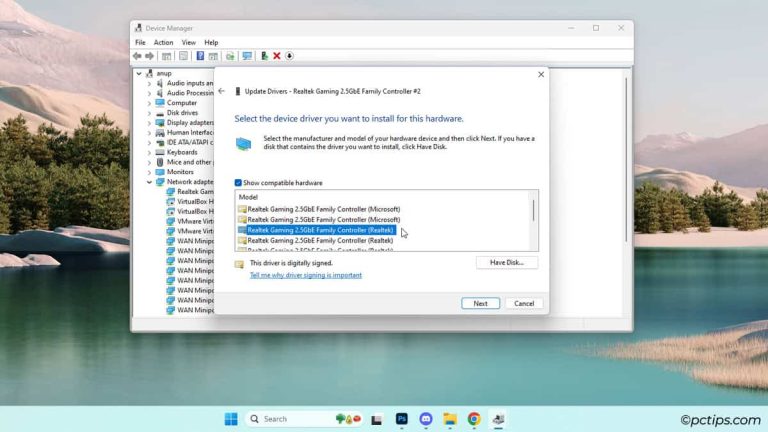
- Update Drivers and Software: Often, software updates require hardware drivers—such as graphics or network drivers—updated to work seamlessly with the new system software. Check manufacturer websites to locate the most recent drivers compatible with your device to ensure all elements are functioning together harmoniously.
- Run Diagnostic Tools: Many operating systems come with built-in diagnostic tools designed to identify and fix software and hardware issues. For example, Windows includes the “Troubleshoot” feature, which can automatically detect and fix common problems. Take advantage of these tools to receive guided assistance.
In more complex scenarios, you may encounter situations where it’s evident that the update has caused extensive compatibility issues or failures in critical functions. In such cases, restoring your device to a previous version of the software may become necessary. Here are methods to accomplish this safely:
- Roll Back the Update: Some operating systems allow users to revert to a previous version of the software if they choose within a specified timeframe post-update. For instance, Windows users can navigate to Settings > Update & Security > Recovery, where they can select “Go back to the previous version of Windows 10.” This option can provide immediate relief if a recent update has critically impaired functionality.
- Restore from Backup: Regularly backing up your device, whether to a cloud service or an external hard drive, is essential to safeguard against these occurrences. If you’ve recently encountered issues following an update, restoring from a compatible backup can revert your device to a state before the problematic changes were made.
However, if you find that your attempts at resolving the software update problems have been fruitless, seeking professional assistance becomes the next logical step. Not only does this bring in expertise, but it can also prevent accidental damage caused by incorrect troubleshooting techniques. Various certified repair services and tech support companies in the United States can provide thorough assessments, and in situations where repairs are necessary, they can ensure the integrity of your device is preserved.
Staying informed can significantly increase your ability to navigate and mitigate the challenges posed by software updates. Understanding that there’s a vast array of resources, tools, and community support at your disposal will provide you with newfound confidence every time updates roll out. Empowering yourself through knowledge, and knowing what steps to take when problems arise, will transform your tech experience from one of anxiety to one of resilience.
DISCOVER MORE: Click here to enhance your understanding
Addressing Software Update Issues with Assurance
As technology continues to evolve at a rapid pace, software updates play a crucial role in not only enhancing security but also maintaining the overall functionality of our devices. However, the journey through these updates is not always smooth sailing. Users might encounter unexpected glitches or performance issues following an update, which can be a source of frustration. In such scenarios, it is essential to maintain a level head and utilize a structured approach to troubleshooting.
Begin your troubleshooting journey with basic measures. Restarting your device can often resolve minor glitches by refreshing the system. Additionally, checking for any pending updates might be necessary, as sometimes updates can be rolled out in stages, and you could still have a crucial fix waiting. Clearing the cache can also be a quick fix, as residual files may interfere with the new update’s functionality.
If these initial steps do not yield results, it may be time to explore advanced solutions. Booting your device in Safe Mode allows you to diagnose whether the issue is caused by third-party applications or the update itself. Furthermore, rolling back updates can be a viable option when the newest version introduces instability or incompatibility with existing software. This process is often straightforward but typically requires navigating through your device’s settings.
Empower Yourself with Knowledge
Familiarizing yourself with helpful tools and resources is key to successfully overcoming these technical hurdles. Each device often comes with specific restore options tailored to assist users during difficult times. Additionally, utilizing backup restoration can save you from data loss, should you need to revert to a previous version of software. In the United States, services such as Apple’s Genius Bar or Microsoft Support are readily available for those seeking expert guidance, while online forums like Reddit or dedicated tech sites can provide community-driven advice.
Prepare for the Future
Ultimately, the goal is to embrace a proactive approach to software management. Regularly backing up your data ensures that you can quickly address issues when they arise without the fear of losing valuable information. Maintaining updated drivers can prevent compatibility issues that often surface after updates. By taking these precautionary steps, users can transform the often stressful experience associated with software updates into an opportunity for personal growth and technological understanding.
In conclusion, the next time you face a challenge stemming from a software update, remind yourself that you are equipped with the necessary tools and knowledge to navigate these waters confidently. With preparation and a methodical approach, what may initially seem like a daunting tech problem can become a triumph over technology. Dive into the resources available, and you may discover newfound skills that enrich your tech-savvy journey.
Related posts:
The Role of User Feedback in Shaping Future Software Updates
How to Roll Back Software Updates: A Step-by-Step Guide
Tips to Prepare Your Device Before Performing a Software Update
How to Verify if Software Updates Are Actually Installed Correctly
The Importance of Regular Software Updates for Cybersecurity
The Future of Software Updates: Trends and Innovations to Watch Out For

Beatriz Johnson is a seasoned tech writer and digital tools expert with a passion for simplifying the complexities of technology and mobile applications. With over a decade of experience in the tech industry, she specializes in topics like productivity apps, software reviews, and emerging digital trends. Through her work, Beatriz empowers readers to make informed technology choices and stay ahead in the ever-changing world of apps and innovation.